
Interaxon
Muse 2 App Design
My Role
Discovery planning, wireframing, prototyping, product design, stakeholder collaboration, high fidelity designs, video editing
Muse is a brain-sensing headband takes the guesswork out of meditation by giving you real-time auditory feedback on how busy, neutral, or calm your mind is. Additionaly Muse can detect heart-rate, breathing, and stillness, giving you more in-depth insights into your meditation practice.

Overview
When the Muse 2 Headband launched the Muse App was in need of a re-design to accomodate the new sensors in the headband and different meditation styles.
Each meditation begins with configuring the session, headband sensor check, session countdown, and results at the end of each session. My design process had to consider everything from sensor success to poor sensor quality, to drops in Bluetooth signal, low battery alerts, and keep many of these issues invisible from the user, making for a seamless end to end experience.
Muse Site Map

Brainstorming and Whiteboarding
An important part of my design process at Muse was brainstorming with key stakeholders on the project. This would typically include the product manager, and sometimes another designer. Whiteboarding is an excellent way of quickly visualizing ideas to get the team on the same page about where we were heading.
Developers were looped in at early stages to ensure the design vision was plausible from a development perspective.


Basic Meditation Flow
The user chooses the meditation type, configures soundscape and time, checks to ensure that all sensors are making contact with their head. Once they have successfully connected the sensors the meditation will begin and ends with results showing how active, neutral, or calm their mind was. The user collects points and stats for every meditation they complete.

Homescreens
Upon launching the app the user can swipe the homescreen left and right to reveal different kinds of meditation modes between Mind, Heart, Body, and Breath. Each screen has a simple video that loops.
On the homescreen the user can see their meditation goal progress, connect their headband, configure their meditation session or simply just drop in to a meditation.
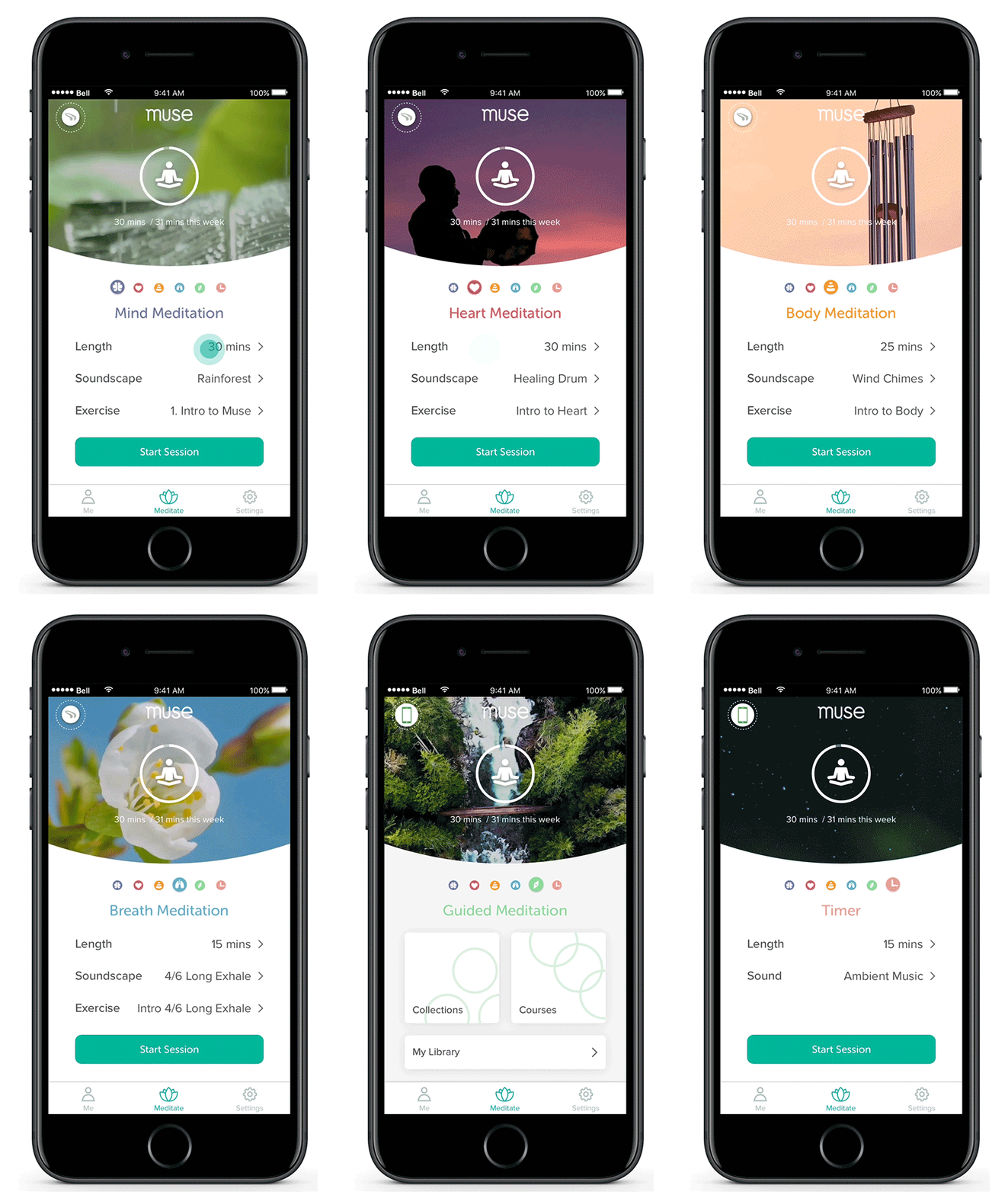

After Effects prototype
Seemless Bluetooth Connection
There are 4 kinds of Muse empowered devices that can connect to the Muse App; Muse, Muse 2, Muse S, and the Lowdown Focus.
I designed the App to ask you to connect your device during onboarding, and any other time you power on your device it will automatically connect when the app is open. The homescreen has an indicator in the top left corner that shows whether the device is searching and connecting (spinning dashed line) or connected (solid line). Tapping on the device symbol opens a menu to troubleshoot connection problems or choose a different device to connect to.

